Assignment 4: Mobile Manipulator Extra Credit Guide
Assignment 4: Mobile Manipulator Extra Credit Guide
CS498GC Mobile Robotics - Fall 2025
📅 Important Deadlines & Extra Credit Opportunities
Early Submission Bonus Points 🌟
- Submit before November 9, 2025: +20 Bonus Points
- Submit before November 14, 2025: +10 Bonus Points
- Applies to: Assignment 4 Part 1
Regular Deadlines
- Part 1: November 21, 2025 @ 11:00 PM (25 points)
- Part 2: December 9, 2025 @ 11:00 PM (75 points)
- Total Possible: 100 points + up to 20 bonus = 120 points
Gradescope Information
- Course Code: KDP5G8
- Submission Format: PDF report + rosbag file + screen recording
🎥 Demo Resources
1. Demo Recording Links
Main Demo Recording
- Link: Demo Recording
- URL:
https://drive.google.com/file/d/1TVCehZ8cksYwapauqrUs_4s2lsiecR_E/view?usp=share_link - Note: Only the first video’s window was recorded. Audio is present for the Bash script image and PDF slide deck.
Husky Robot Demo (Second Video)
- Link: Husky UR3 Gripper Demo
- URL:
https://drive.google.com/file/d/1FVhyBrrrvM0TzXG092dVYTzzvB7eGf9Y/view?usp=sharing - Contents:
- Husky robot as mobile base
- UR3 arm with Robotis Gripper
- Local and global navigation
- Bash script to launch all files
- Controllers correctly launched
2. Assignment 4 Part 1 Slide Deck PDF
Primary Resource
- Latest Version: assignment4_part1_demo_main_VER1.16_PDF_ASSIGNMENT4.pdf
- Features: Fully revised, beautifully rendered, no content cutoff
- Updated: November 4, 2025 @ 3:28 AM
Alternative Link
- Google Drive: Slide Deck PDF
- URL:
https://drive.google.com/file/d/1ohlPm3fGtu99IuSKNHaQ0uCQNHpwxsMg/view?usp=sharing
💻 GitHub Repository
Official Repository
- URL: https://github.com/kulbir-ahluwalia/husky_ur3_simulator
- Branch: Assignment 4 - Part 1
- Contents:
- Complete ROS2 package structure
- Launch files for Gazebo simulation
- Controller configurations
- URDF/Xacro files for robot description
- Example gripper commands
Key Files in Repository
husky_ur3_simulator/
├── launch/
│   ├── gazebo_sim.launch.py
│   ├── controllers.launch.py
│   └── teleop.launch.py
├── config/
│   ├── controllers.yaml
│   └── ros_gz_bridge.yaml
├── urdf/
│   ├── husky.urdf
│   ├── ur3.urdf
│   └── gripper.urdf
└── scripts/
    └── gripper_controller.py
🚀 Bash Script for Consistent ROS2 Launches
Complete Example Script
Save this as example_bash_script_for_consistent_ros_launch.sh:
#!/bin/bash
# Example Bash Script for Consistent ROS 2 Launch
# CS498GC Mobile Robotics - Assignment 4
# Adapted from ROS 1 Noetic to ROS 2 Jazzy/Humble
# Date: 2025-10-29

# Colors for output
RED='\033[0;31m'
GREEN='\033[0;32m'
YELLOW='\033[1;33m'
NC='\033[0m' # No Color

# ROS 2 workspace paths
ROS_DISTRO="jazzy"  # Change to "humble" if using ROS 2 Humble
ROS_WS="$HOME/ros2_ws"

echo -e "${GREEN}Starting ROS 2 Assignment 4 Launch Sequence...${NC}"

# Check and deactivate conda if active
if [ ! -z "$CONDA_PREFIX" ]; then
    echo -e "${YELLOW}Deactivating conda environment...${NC}"
    conda deactivate 2>/dev/null || true
fi

# STEP 1: Opens up a terminal window 1 - Gazebo Simulation
echo -e "${GREEN}Step 1: Launching Gazebo simulation with Husky + UR3 + Gripper...${NC}"
gnome-terminal -- bash -c "source /opt/ros/${ROS_DISTRO}/setup.bash && \
    source ${ROS_WS}/install/setup.bash && \
    ros2 launch husky_ur3_simulation gazebo_sim.launch.py; \
    exec bash"
sleep 5

# STEP 2: Opens a new Terminal window 2 - Robot State Publisher & Controllers
echo -e "${GREEN}Step 2: Launching robot state publisher and controllers...${NC}"
gnome-terminal -- bash -c "source /opt/ros/${ROS_DISTRO}/setup.bash && \
    source ${ROS_WS}/install/setup.bash && \
    ros2 launch husky_ur3_simulation controllers.launch.py; \
    exec bash"
sleep 3

# STEP 3: Opens a new Terminal window 3 - Teleoperation
echo -e "${GREEN}Step 3: Launching teleoperation for mobile base...${NC}"
gnome-terminal -- bash -c "source /opt/ros/${ROS_DISTRO}/setup.bash && \
    source ${ROS_WS}/install/setup.bash && \
    ros2 run teleop_twist_keyboard teleop_twist_keyboard; \
    exec bash"
sleep 3

# STEP 4: Opens a new Terminal window 4 - Gripper Controller
echo -e "${GREEN}Step 4: Launching gripper controller...${NC}"
gnome-terminal -- bash -c "source /opt/ros/${ROS_DISTRO}/setup.bash && \
    source ${ROS_WS}/install/setup.bash && \
    ros2 run husky_ur3_simulation gripper_controller; \
    exec bash"
sleep 3

# STEP 5: Opens a new Terminal window 5 - ROS 2 Bag Recording (commented out by default)
echo -e "${YELLOW}Step 5: Recording setup (uncomment to enable)...${NC}"
# gnome-terminal -- bash -c "source /opt/ros/${ROS_DISTRO}/setup.bash && \
#     source ${ROS_WS}/install/setup.bash && \
#     ros2 bag record -a -o assignment4_recording --max-bag-duration 30; \
#     exec bash"
# sleep 3

# STEP 6: Opens a new Terminal window 6 - MoveIt2 (for Part B)
echo -e "${YELLOW}Step 6: MoveIt2 setup for Part B (commented out)...${NC}"
# gnome-terminal -- bash -c "source /opt/ros/${ROS_DISTRO}/setup.bash && \
#     source ${ROS_WS}/install/setup.bash && \
#     ros2 launch husky_ur3_moveit_config move_group.launch.py; \
#     exec bash"
# sleep 3

# STEP 7: Opens a new Terminal window 7 - Navigation Stack (for Part B)
echo -e "${YELLOW}Step 7: Navigation stack for Part B (commented out)...${NC}"
# gnome-terminal -- bash -c "source /opt/ros/${ROS_DISTRO}/setup.bash && \
#     source ${ROS_WS}/install/setup.bash && \
#     ros2 launch nav2_bringup navigation_launch.py use_sim_time:=true; \
#     exec bash"
# sleep 3

# STEP 8: Opens a monitoring terminal - Check topics
echo -e "${GREEN}Step 8: Opening monitoring terminal for topic verification...${NC}"
gnome-terminal -- bash -c "source /opt/ros/${ROS_DISTRO}/setup.bash && \
    source ${ROS_WS}/install/setup.bash && \
    echo 'Waiting for topics...' && sleep 5 && \
    echo '=== Active Topics ===' && \
    ros2 topic list && \
    echo '' && \
    echo '=== Topic Frequencies ===' && \
    timeout 5 ros2 topic hz /odom & \
    timeout 5 ros2 topic hz /imu & \
    timeout 5 ros2 topic hz /scan & \
    wait && \
    echo '' && \
    echo 'Press Enter to continue...' && \
    read && \
    exec bash"

echo -e "${GREEN}===========================================${NC}"
echo -e "${GREEN}All terminals launched successfully!${NC}"
echo -e "${GREEN}===========================================${NC}"
echo ""
echo -e "${YELLOW}Terminal Windows:${NC}"
echo "  1. Gazebo Simulation"
echo "  2. Controllers"
echo "  3. Teleoperation (use keys to move robot)"
echo "  4. Gripper Controller"
echo "  8. Monitoring Terminal"
echo ""
echo -e "${YELLOW}Key Commands:${NC}"
echo "  Teleoperation: Use arrow keys, i/k for forward/back"
echo "  Gripper Open:  ros2 topic pub -1 /rh_p12_rn_position/command std_msgs/msg/Float64 '{data: 0.0}'"
echo "  Gripper Close: ros2 topic pub -1 /rh_p12_rn_position/command std_msgs/msg/Float64 '{data: 1.05}'"
echo ""
echo -e "${YELLOW}To record rosbag (30 seconds):${NC}"
echo "  ros2 bag record -a -o assignment4_netid --max-bag-duration 30"
echo ""
echo -e "${GREEN}Script completed. Check all terminal windows for errors.${NC}"
Script Features
Your bash script automatically launches:
- Gazebo simulation with Husky + UR3 + Gripper
- Controllers for robot control
- Teleoperation for mobile base control
- Gripper controller
- Monitoring terminal to verify all topics
To Run the Script
cd /your_directory/demo_assignment4_part1/
chmod +x ./example_bash_script_for_consistent_ros_launch.sh
./example_bash_script_for_consistent_ros_launch.sh
The script will:
- Open multiple terminal windows
- Provide colored status messages to track the launch sequence
- Include corrected gripper commands (0.0 for open, 1.05 for close)
📋 Deliverables Checklist
Part 1 Requirements (25 points + 10 bonus)
✅ Rosbag Recording (30 seconds)
ros2 bag record -a -o assignment4_[netID] --max-bag-duration 30
Required Topics:
/cmd_vel- Velocity commands/odom- Odometry (50 Hz)/joint_states- All joint positions/imu- IMU data (100 Hz)/scan- Laser scan (10 Hz)/gripper_position_controller/command- Gripper commands
✅ Screen Recording (30 seconds)
- 10 seconds: Mobile base movement (forward, backward, turn)
- 20 seconds: Gripper demonstration (open and close)
- Format: MP4 or MOV
- Tool: OBS Studio or QuickTime
✅ Submission Format
- Create folder:
assignment4_part1_[netID]/ - Include files:
rosbag/- Contains recorded bag filescreen_recording.mp4- Screen captureREADME.txt- Brief description
Part 2 Requirements (75 points)
- MoveIt2 integration
- Navigation stack implementation
- Pick and place demonstration
- Detailed documentation
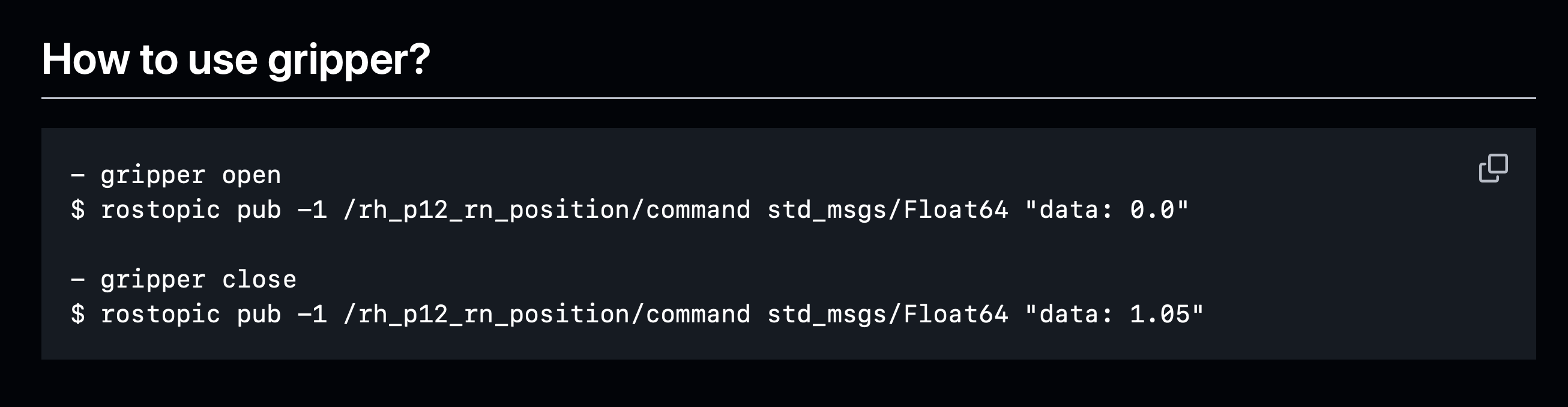
🎯 Gripper Control Commands
Updated Commands (Corrected Values)
Open Gripper
ros2 topic pub -1 /rh_p12_rn_position/command std_msgs/msg/Float64 '{data: 0.0}'
Close Gripper
ros2 topic pub -1 /rh_p12_rn_position/command std_msgs/msg/Float64 '{data: 1.05}'
Visual Reference
🔧 Troubleshooting
Common Issues and Solutions
Qt5/GPU Errors
export QT_QPA_PLATFORM=xcb
export LIBGL_ALWAYS_SOFTWARE=1
Missing Topics
Check ros_gz_bridge configuration:
ros2 param get /ros_gz_bridge config_file
Transform Errors
ros2 run tf2_tools view_frames
evince frames.pdf
Controller Not Loading
ros2 control list_controllers
ros2 control load_controller gripper_position_controller
ros2 control set_controller_state gripper_position_controller active
📚 Additional Resources
Course Links
- Course Website: https://kulbir-singh-ahluwalia.com/cs498gc/fa25/
- Assignment 4 Page: https://kulbir-singh-ahluwalia.com/cs498gc/fa25/assignments.html
- Campuswire: For questions and discussions
- Canvas: For grade tracking
Documentation
- ROS2 Documentation: https://docs.ros.org/en/jazzy/
- Gazebo Sim: https://gazebosim.org/docs
- MoveIt2: https://moveit.picknik.ai/
Office Hours
- TA Office Hours: Wednesdays 1:30-2:30 PM @ SC 4407
- Special Sessions: Sept 17 & Oct 1 via Zoom
📝 Important Notes
From the Announcement (October 24, 2025)
“Prof Girish and I are both concerned that many students are not starting early enough for Assignment 4 which is the hands-on ROS semester long project for your learning and benefit.”
Key Points:
- Start early to maximize learning
- Attend office hours for help
- Ask questions on Campuswire
- Watch demo videos for guidance
Motivational Note
“We will showcase the Deliverable TEASER Video this Friday, Oct 24 in class, SC0216, 3:30pm, to motivate all students as to how thrilling it is to control a Mobile Manipulator robot in your own local setup!!”
📧 Contact
Teaching Assistant: Kulbir Singh Ahluwalia
- Email: ksa5@illinois.edu
- Website: https://kulbir-singh-ahluwalia.com/
Instructor: Professor Girish Chowdhary
- Email: girishc@illinois.edu
- Lab Website: http://daslab.illinois.edu
Last Updated: November 7, 2025